Set up for your work
The first launch guides your choice of functions. Start with what your practice needs, without having to enable intelligent tools to use the workspace.
 MediFlow
MediFlow brings the patient record, source documents and work still to do into a free, open-source workspace for outpatient care. It helps you work from the clinical context while keeping interpretation and decisions in professional hands.
Use the full workspace without AI. Add intelligent functions only where they earn a place in your work.
Explore the workspace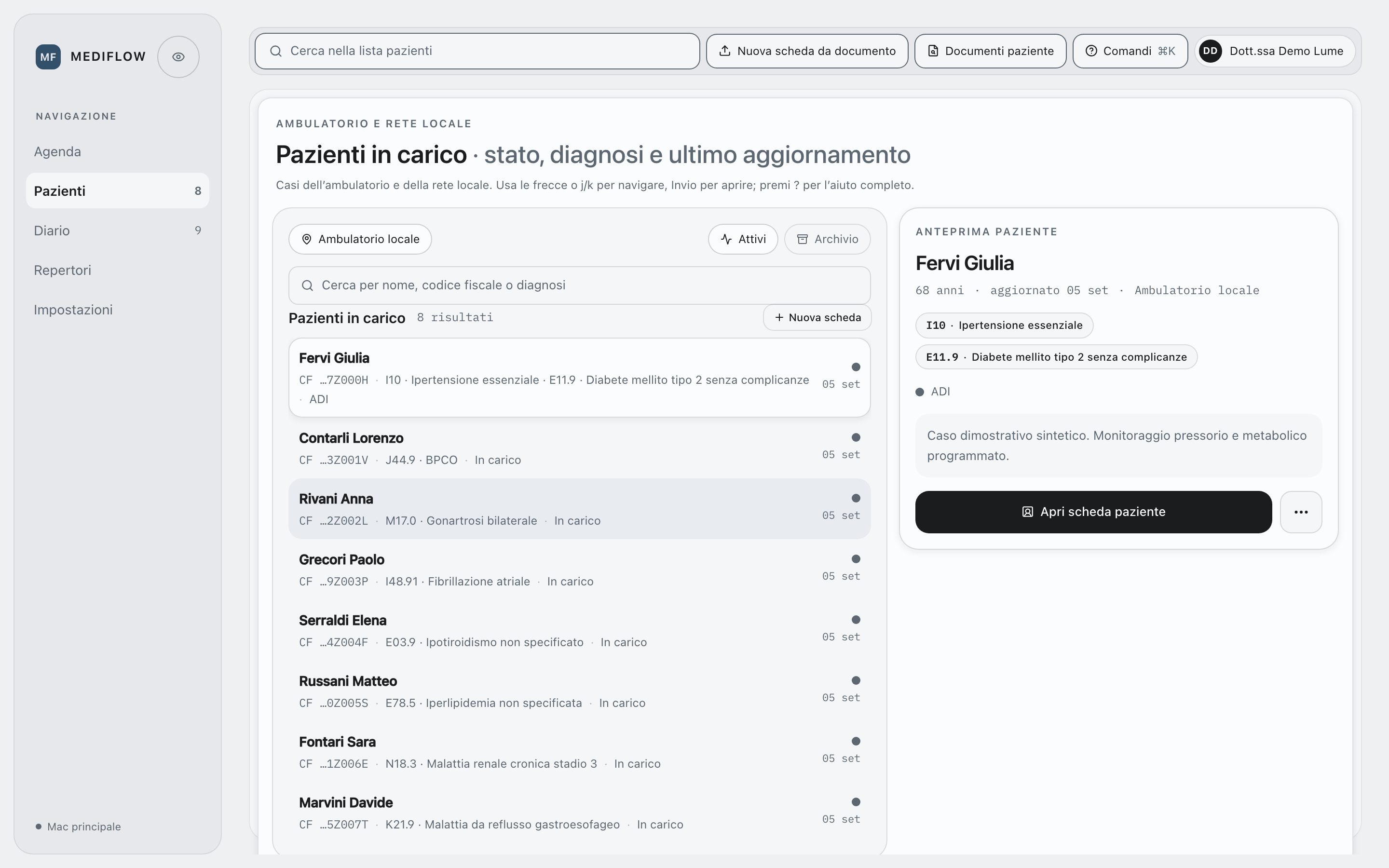
0.8.6 · Available as source code
Guided setup in 0.8.6 lets you decide which functions belong in your workspace. Clinical views and settings remain distinct, so configuring the system and working with a patient’s record have their own places.
Using this version means working from source on a Mac. MediFlow runs on that computer, with the interface in its local browser.
View the screensThe first launch guides your choice of functions. Start with what your practice needs, without having to enable intelligent tools to use the workspace.
Uploading a document, reading the original and reviewing extracted text or a synthesis are different steps. Keeping them distinct lets you check how information was obtained.
The optional ChatGPT integration must be enabled and checked for the selected function. Signing in alone does not establish that it is ready for clinical data.
A reference is useful when its origin and currency are clear. AIFA medicines data retain their source and date; WHO needs a separately configured and checked service.
Top navigation serves patients and their records. A separate sidebar groups the settings, giving clinical work and system configuration distinct places in the interface.
Compatible clients and agents reach authorized functions through MediFlow, not the database. They may prepare a proposal; confirmation of a clinical change stays with the professional.
Native app sources are part of the project, not a promise of a ready-to-install app. Their verification and distribution are separate; 0.8.6 includes no signed or notarized installers. Windows, Linux, Mini, iOS and iPadOS remain in the 1.0 roadmap.
An appointment rarely stands alone. A previous report may explain a treatment, while today’s findings leave a result to review or a check to arrange. The record needs to support that continuing work, not just document that a visit took place.
MediFlow brings notes, documents, treatments, measurements and outstanding activities into one workspace, making what you record available when the case next needs attention.
A code can name a condition without explaining its significance for a particular person. Structured fields make information easier to organize; clinical text preserves the context needed to understand it. MediFlow gives both a place.
A catalogue can change after an observation has been recorded. Retaining the source and version of the reference lets you see what was used at the time, rather than read the past through today’s catalogue.
Terminology search helps find a code, not establish its appropriateness for the consultation. WHO Search requires an optional, separately configured local service, the sidecar; curated catalogues in the Apple app sources are not a live WHO ICD-11 catalogue. Scales distinguish missing answers from explicit values and retain their source and version in the history.
The local POMA-28 translation should not be taken as evidence of a clinimetrically validated Italian version of the scale.
Treatments and documents belong to the same clinical history. Pharmaceutical catalogues provide references for that work, while FHIR export prepares data for exchange in a documented format.
AIFA catalogue updates can come from the official source or a local file; their date and origin remain available. Exemption records require review of the import preview and a backup before replacement. FHIR export follows a defined contract rather than guaranteeing compatibility with every receiving system. FHIRv2 still requires checks to establish equivalent behaviour.
Explore how data moves through MediFlowA phone call may raise a different question about a patient you already know. The useful starting point is the relationship between the report, the treatment and the follow-up still to arrange, rather than any one item on its own.
That is also a reason to consider AI selectively. A summary, suggested structured data or a reading across documents can help bring scattered information together while preserving the route back to its sources.
These aids require a function to be selected and enabled. Models can be wrong, so the result still needs professional review against the source material.
A call is easier to place in context when diagnoses, treatments, measurements and outstanding activities can be read as part of one patient’s history, not as unrelated entries.
These 0.8.6 Web views show the separation between clinical work and settings. All data is synthetic: the preview illustrates the interface, not the execution of intelligent functions.
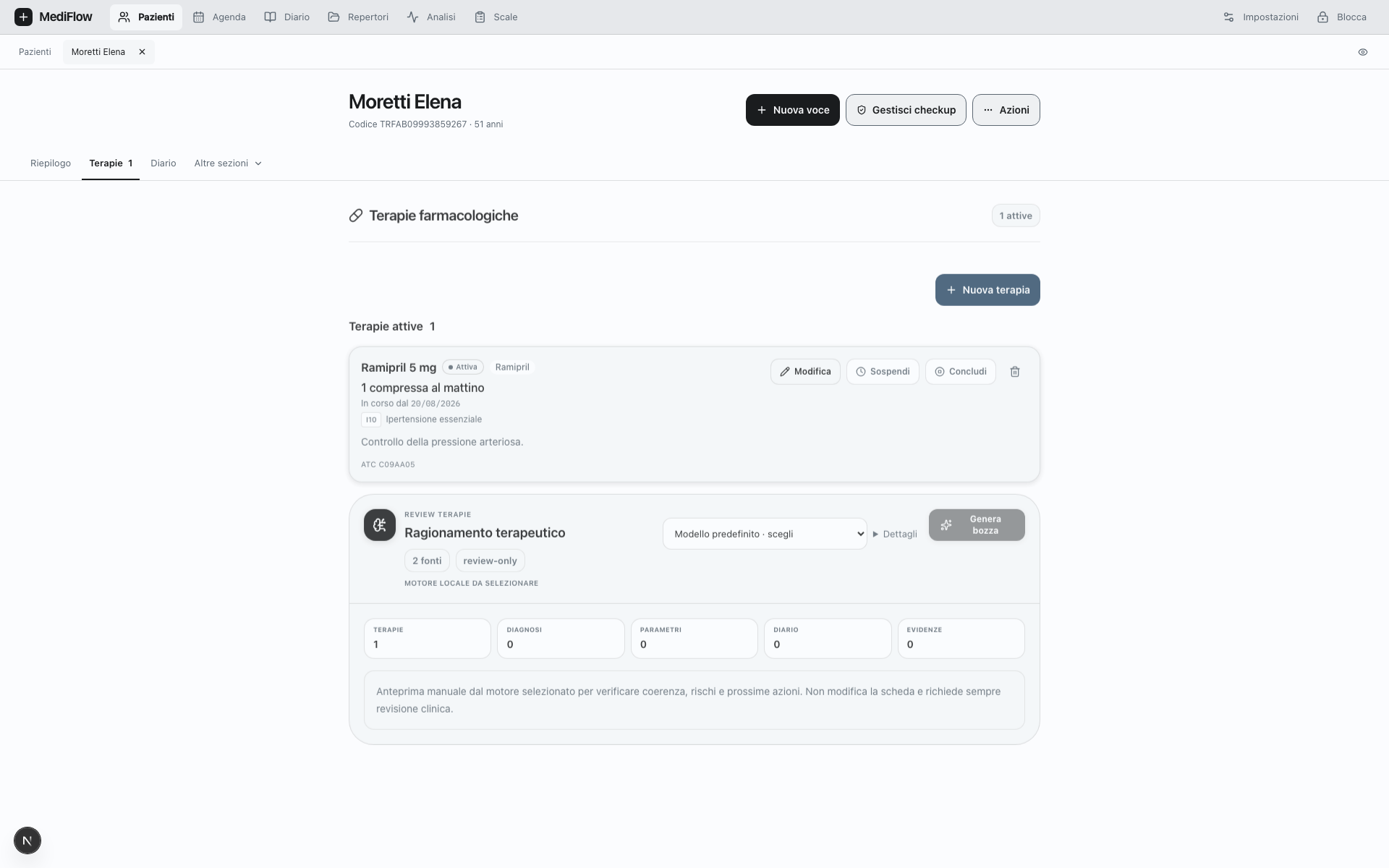
MediFlow’s full workspace is usable without AI, which is off until you choose to enable it. Intelligence Fabric provides the supporting structure for adding optional functions without making a model a condition of ordinary work, including where resources are limited.
A treatment review and a reading across documents do not need the same kind of help. Fabric therefore separates four functions, each with its own permitted tools, data and permissions. Their outputs are proposals for professional review, not clinical decisions.
A summary brings relevant parts of the history together as a starting point for reviewing a case, not a substitute for reading it.
Check the proposal against the record, its sources and the patient’s current situation. Recalled information can be incomplete or no longer relevant; a summary does not replace the clinical history.
Model selection is limited by the MediFlow catalogue for each function. When configured locally, Ollama can serve the first three functions; optional ATHENA/MLX is reserved for Treatment Reasoning on compatible Macs. External services are off by default and need explicit activation. They never take over silently when a local route is unavailable.
The ChatGPT integration is optional and off by default. Signing in, enabling a function and checking that it works are separate steps; a ChatGPT account is not equivalent to OpenAI API access. Before any content is sent, the relevant consent is required and MediFlow checks access, permissions and the validity of the selected data. The response stays linked to its sources for review and cannot confirm a clinical change.
Choosing an external model also means deciding what information may leave the computer. The designed process limits content to what is needed, replaces identifiers and reconciles the result locally. These protections are enabled per function and are not available on every route.
Narrative clinical text remains blocked until the required controls are available and passed, with no implicit alternative route for sending it. Replacing identifiers is pseudonymization, not a guarantee of anonymity: the GDPR still applies.
The Mac holds the record and the services that govern access. Browsers, authorized clients and agents use those services: changing the tool does not change the rules for the data.
Specific functions can be reached without opening the full interface. Access still requires authentication, remains limited to the authorized task and leaves a record of the operations.
Mini is the command-line version: it searches references, reads activities and prepares proposals from a terminal through MediFlow services. It is not agentic headless access, which uses a separate contract and clients. Mini remains a 1.0 roadmap direction.
The synthetic-data demonstration covers a local Mac connection: Web sign-in and authorization, a search for the hemoglobin LOINC code and a plan of two reads. It shows Mini reaching the services, not assessing a clinical case.
There were no open activities for the synthetic patient, so both the list and follow-up proposal were empty. That does not demonstrate the quality of a proposal with substantive clinical content. No clinical changes were saved.
Clinical functions are not exposed before Web authorization. If the Supervisor is missing, Mini reports the connection as unavailable; signing out closes the session processes. The demonstrated scope is a local Mac, not every platform.
CLI → Supervisor → MediFlow services
Access: authorization from the Web
Search: hemoglobin · LOINC 718-7
Activities for synthetic patient: none
Follow-up proposal: empty, nothing saved
Demonstrated plan: two reads
Logout: session processes closed
A development demonstration using synthetic data, not a live terminal on this site or clinical verification of 0.8.6.
This is separate from Mini: Codex is shown as one possible client of MediFlow’s agent interface. The demonstration crosses a worklist, polypharmacy and several sources, then prepares a review queue without writing to the record.
Demonstration with entirely invented data. Codex uses only granted read and preparation capabilities; this site is not connected to a record.
The project documentation sets out the requirements for the Mac and the browser interface on localhost. Being able to work without AI does not mean MediFlow can run on any hardware.
Public source code is not clinical validation. Before real clinical data is used, the software must be assessed in its intended environment. Synthetic tests demonstrate bounded behaviour, not the system’s clinical suitability.
Read the project documentation on GitHubDeciding where and how to process information also means being accountable for its use. MediFlow starts locally, limits access and retains sources so that assistance from a tool does not obscure the path the data takes.
Minimization, encryption of sensitive clinical fields and traceable operations are technical choices. A real deployment must also establish its purposes, roles and legal basis. Architecture alone cannot settle those responsibilities.
Privacy concerns how data is used throughout, not just where it is stored.
The assessment must address the legal basis, conditions for processing health data, roles, retention, security and whether an impact assessment is needed. Local operation helps control data but does not by itself establish compliance for its use.
Read the GDPR regulationAn aid to reasoning needs to be assessed for what it does and the part it plays in the decision.
Intended purpose, function and the roles of operators determine the assessment of classification and obligations. Human review is a control, not certification. Any qualification as a medical device requires a separate assessment.
Read the AI Act regulationOpen code allows people to question the choices behind a tool, not just use it. MediFlow is free and aims to remain so, making study, discussion and contribution part of what the project offers.
Explore the project.